AI & Automation · Marketing Teams
✍️ Bea Lejano; 📅 April 2026; ⏱ 7 min read
Your marketing team is making content and campaign decisions every week. But how much of that decision-making is based on current, structured intelligence about your industry — and how much is based on whatever someone happened to read last week?
Most marketing teams don’t have a dedicated competitive intelligence function. Monitoring industry news, tracking competitor activity, and surfacing relevant trends tends to happen informally — when someone remembers to check, or when a piece of content happens to land in the right inbox at the right time.
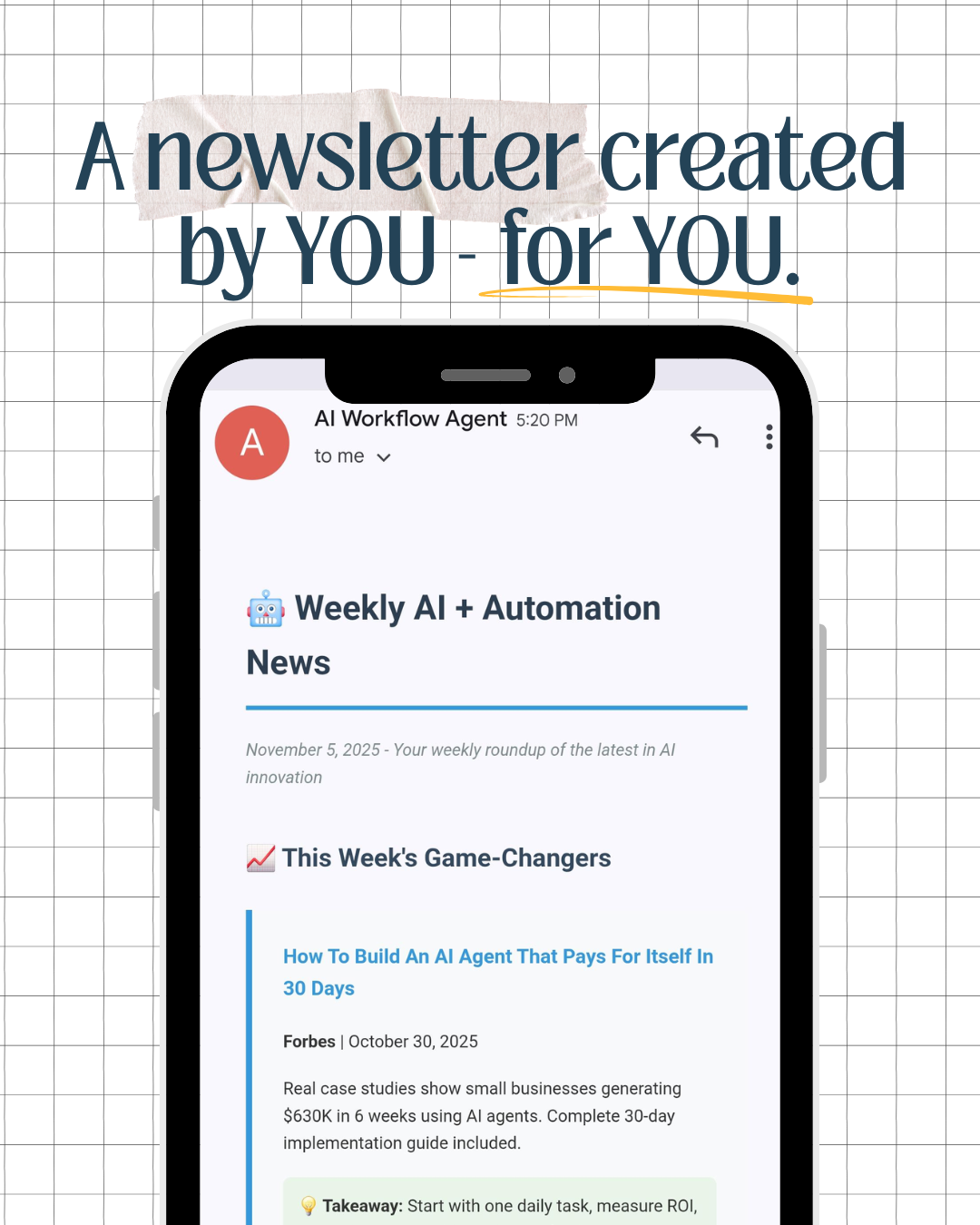
This post walks you through how to build an automated AI-powered industry monitoring system using Zapier Agents — one that scans your defined sources weekly, summarizes what’s relevant, and delivers a curated intelligence briefing to your team every Monday morning. No manual searching, no information overload, no missed signals.
What This System Actually Does
Once built, the Zapier AI Agent runs on a weekly schedule and does the following automatically:
The result: your marketing team starts every week with a structured picture of what’s happening in your industry — without anyone spending hours doing research manually.
What Your Team Can Do With This Intelligence
An automated weekly intelligence briefing isn’t just a nice-to-have. Here’s how marketing teams actually use it:
Spot emerging topics in your industry before competitors post about them. Turn weekly trends into carousels, blog posts, and email campaigns while the topic is still timely.
Track competitor announcements, product launches, and positioning changes without manually checking their sites and social accounts every week.
Ground campaign ideas in current market context. Know what’s resonating in your industry right now — not what worked six months ago.
Use the weekly briefing as input for marketing updates to leadership — showing market context for decisions rather than just internal metrics.
How to Build It: Step-by-Step
This takes about 30–45 minutes to set up. You’ll need a Zapier account — the free plan works to start, though a paid plan gives you more sources and flexibility.
Create a Zapier Account and Navigate to Zapier Agents
Go to zapier.com and create an account if you don’t have one. Once logged in, navigate to Zapier Agents from the main menu. If it’s your first time, Zapier will walk you through a quick onboarding.
Tip: Set your correct timezone in account settings before starting — this ensures your scheduled briefing arrives at the right time.
Start a New Agent from Scratch
In the Agent builder, select “Start from scratch” — this gives you full control over what the agent monitors and how it formats the output. You’ll land in the prompt configuration area where you’ll instruct the agent on what to search, filter, and summarize.
Configure Your Agent Prompt
This is the most important step. The prompt tells the agent exactly what to search for, where to look, what to include or exclude, and how to format the output. Use the template below as your starting point — replace the bracketed sections with your specific industry, competitors, and keywords.
OBJECTIVE
Search weekly for the most relevant, practical, and up-to-date news and developments in [your industry, e.g. herbal manufacturing / trading / property management] published within the last 7 days. Summarize and deliver these findings via email every [day, e.g. Monday] at [time, e.g. 8:00 AM].
SEARCH FOCUS
Monitor for updates relevant to our marketing team across these priority areas:
→ [Competitor names] — product launches, announcements, campaigns, pricing changes
→ [Industry keywords] — trends, regulatory updates, market shifts
→ [Target audience topics] — what your customers are reading, searching for, and discussing
SOURCES TO MONITOR
Replace with sources relevant to your industry. Use ChatGPT to help identify the best sources for your niche.
→ Industry publications: [e.g. BusinessWorld, Manila Bulletin Business, industry association sites]
→ Competitor websites and press pages: [list URLs]
→ Discussion platforms: Product Hunt, LinkedIn trending content in your industry
→ News aggregators: Google News filtered for [your industry keywords]
EXCLUDE
→ Clickbait, low-authority blogs, and duplicate reposts
→ Content older than 7 days
→ Sponsored content without substantive insight
FOR EACH ARTICLE, EXTRACT
→ Date of publication
→ Title and source
→ 2–3 sentence summary of the key development
→ Practical takeaway: one-line implication for our marketing team
→ Link to the full article
EMAIL FORMAT
→ Subject: [Your company] Weekly Intelligence Briefing — [Date]
→ Short intro: “Here’s your weekly market and competitor update.”
→ Numbered list of articles with title, summary, takeaway, and link
→ Closing: “See you next week.”
QUALITY CHECKS BEFORE SENDING
→ All links are valid and accessible
→ No duplicate entries
→ All sources are from verified publications
→ All content is within the last 7 days
The more specific your industry keywords and competitor names, the more targeted the briefing will be. Spend time on this section — it’s what separates a useful briefing from a generic one.
Set the Trigger to “Schedule by Zapier”
In the Trigger option, select “Schedule by Zapier” and configure it to run weekly on your chosen day and time. Monday morning works well for most marketing teams — the briefing is ready before the week’s content planning begins.
Set the Tool to “Email by Zapier”
In the Tools section, select “Email by Zapier: Send Outbound Email” and enter the recipient email address — your marketing team’s shared inbox or distribution list works best. Click Configure and only change the recipient field — leave the other settings for the agent to determine based on your prompt.
To send to multiple recipients, add them as a comma-separated list in the recipient field.
Test Your Agent and Refine
Run a test to see what the agent produces. Check whether the sources, depth, and format match what your team actually needs. Refine your prompt based on what comes back — you may need to add more specific keywords, adjust the number of sources, or tighten the summary format.
Expect to iterate 2–3 times before the output feels right. That’s normal — the prompt refinement is where the real customization happens.
⚠️ Note on the Free Zapier Plan:
If you’re using Zapier’s free plan, agents are limited to 10 actions per run. Each website search and the email send each count as one action. To stay within that limit, start with 7–8 news sources and leave the final 2 actions for formatting and sending. For broader monitoring across more sources, a paid Zapier plan gives you significantly more flexibility.
Tips for Making This Actually Useful
Where to Take This Next
Once the basic weekly briefing is working, there are a few natural extensions worth considering:
Add a Zapier step to log each briefing to Google Sheets — building a searchable archive of competitive intelligence over time.
Post the weekly summary to a dedicated Slack channel so the whole team sees it — not just whoever checks their email first.
Build a second agent that runs monthly and generates a strategic summary of patterns from the past four weeks — trends, competitor moves, and content opportunities.
Route intelligence items directly into an Airtable content pipeline — tagging each one as a potential content angle for your editorial calendar.
💬 The broader point: this is a simple example of what AI agents can do for operations and marketing teams. The same pattern — schedule a trigger, give the AI a clear brief, deliver a structured output — applies across dozens of internal processes. Once you build one, the logic transfers.
Want Help Building This — Or Something More Complex?
This tutorial covers the basics. If your team needs a more sophisticated intelligence system — connected to your CRM, your content calendar, or your operations tools — that’s exactly what I build for businesses.
Work with Me →
Or send a message at [email protected] to start with a few questions first.
About Bea Lejano
Bea is the founder of Digital Freedom with Bea, an AI and automation systems consultancy based in Metro Manila. With 10+ years of corporate operations experience, she builds custom automation systems for Philippine SMEs, trading companies, and field-driven operations using Airtable, Zapier, Fillout, OpenAI, and the Microsoft 365 stack. www.digitalfreedomwithbea.com